


Tapon
3.81.84K Reviews
App Specs
- Version
- 1.54.2
- Updated On
- License
- Free
- Downloads
- 5,000,000+
- Developer
- Spoton Limited
- Categories
- Books & Reference
- Platform
- Android, iOS
Screenshots


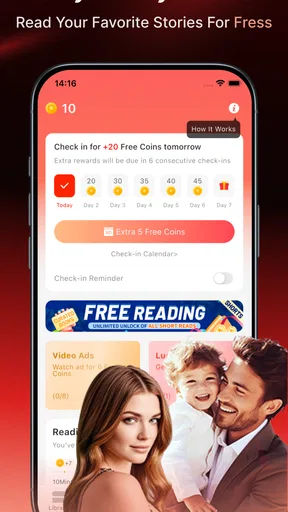
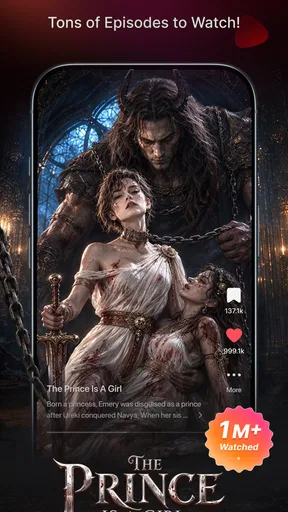
 Analysis by AppCompare
I tend to get stuck with reading apps at the point where browsing becomes more work than reading. A crowded catalogue can make it hard to choose, while a limited selection can leave me with nothing that fits my mood. Tapon is aimed at readers who like discovering serial fiction and moving between genres, and its steady stream of stories gives browsing a clear purpose: find something that makes you want to read the next chapter.
That format suits small pockets of time particularly well. I can imagine opening a story during a commute, reading a little while waiting for an appointment, and returning to it later rather than needing to set aside an evening for a complete book. The trade-off is that serial reading asks for patience: a story that unfolds chapter by chapter may be less satisfying if I want a finished narrative right away. I would treat it as a place to explore ongoing reading, not as a guaranteed substitute for every kind of book library.
Where browsing can slow you down
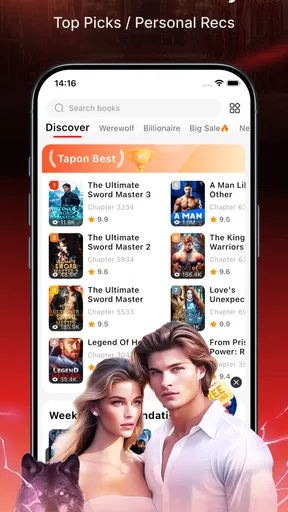
Genre choice is useful, but plenty of options can also turn into decision fatigue. When I am not sure what I want, I would start with a familiar genre and then try one recommendation outside it, instead of opening many titles and losing track of what caught my attention. Covers and titles can spark curiosity, but I would still read a preview or opening chapter before committing to a long-running story. That small pause helps separate a promising premise from a style I actually enjoy.
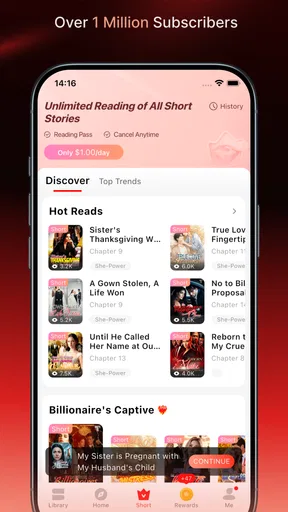
Recommendations can make discovery easier once the app has a sense of my reading habits, but I would not expect them to be perfect from the first session. If the first suggestions miss the mark, that is not necessarily a sign the whole catalogue is a poor fit. A few deliberate choices across different genres give the recommendations more useful signals. Readers who prefer to choose from a fixed, carefully curated list may find this exploratory approach less predictable than a traditional bookstore or library catalogue.
Setup checks before settling in
On a first visit, I would check the basics before building a reading routine: make sure the app is current, confirm that the device meets its operating-system requirement, and open a story while connected so its content can load. Tapon is a free Books & Reference app from Spoton Limited, with in-app purchases ranging from $0.59 to $279.99 per item. That makes it sensible to look carefully at any purchase prompt before tapping through, especially if I only want to sample a story. Free to install does not mean every reading choice has the same cost structure.
The app is rated Mature 17+, so I would take that seriously when deciding whether it is suitable for a younger reader or for a shared family device. Its average rating is 3.8 from around 247,000 ratings, with about 1,800 written reviews, and it has over 5 million installs. Those figures offer a broad snapshot of reader response, not a promise that every story or interaction will suit me. I would use the age guidance and my own judgement rather than treating popularity as a substitute for checking content.
If a story does not appear to open, I would first distinguish a loading problem from a reading preference issue. Checking the connection, closing and reopening the app, and trying another title are sensible first steps. If other stories load but one does not, the trouble may be specific to that item; if nothing loads, I would look at connectivity or app state before assuming the catalogue itself is unavailable. I would avoid repeatedly tapping a purchase control while trying to troubleshoot, since that can blur the difference between opening a chapter and choosing a paid option.
Worth Reading Before You Choose

Switching to Android Auto Means Rethinking Your Driving Routine

Google Calendar Makes a Crowded Week Easier to Manage

Baby Panda World Brings Quick Play to Modern Phones, but Its Game Library Feels Busy

ESPN’s Live Game View Makes Following Close Games Easier

QuizzLand Review: A Good Fit for Short Trivia Breaks, Not Every Player

Basketball Stars: Multiplayer Is Fast, but Can It Recover When Matches Go Wrong?
Diving Into the World of Tapon
So, what makes Tapon stand out in the vast sea of reading apps? First off, it’s the content. Imagine having access to an endless library of books, comics, and novels right at your fingertips. Whether you're into romance, mystery, or fantasy, Tapon has something for everyone. The app curates a diverse collection that keeps you hooked. I found myself exploring genres I’d never considered before, just because they were there, tempting me with their catchy covers and intriguing titles.
The User Experience
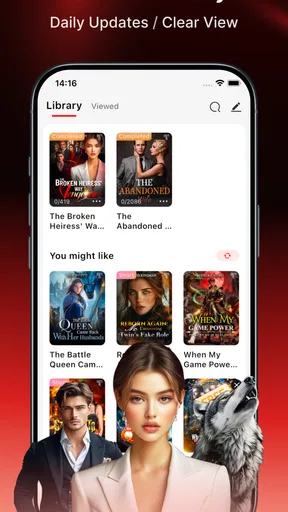
The user interface is sleek and intuitive. You don’t need to be a tech wizard to navigate through it. Everything is neatly categorized, and the search function is super handy. You can easily find a specific title or author without sifting through endless lists. One thing I really appreciate is the personalized reading recommendations. It feels like the app gets to know you, suggesting titles based on your reading history.
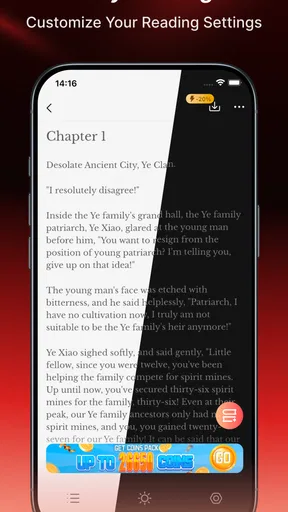
And let’s talk about the reading experience itself. The font is adjustable, making it easy on the eyes, and there’s a night mode for those late-night reading sessions when you should be sleeping but can’t put the book down. We’ve all been there, right?
Community and Interaction
Another cool feature is the interactive community aspect. You can engage with other readers through comments and discussions. It’s like being part of a book club without leaving your couch. Discussing plot twists and character development with others adds a whole new dimension to the reading experience.
Plus, there are author interactions, which are genuinely exciting. Some authors pop in to engage with their readers, answer questions, and even tease upcoming chapters. It’s a nice touch that makes you feel connected to the stories and their creators.
Accessibility and Offline Reading
One of my favorite features has to be the offline reading option. You can download your favorite books and read them without an internet connection. This is perfect for when you’re on the go or in areas with spotty Wi-Fi. Trust me, having a library in your pocket is a game-changer.
The app is available on both Android and iOS, which is a win for everyone. No matter what device you’re using, you have access to your library. Just a simple download from the app store, and you're set!
Final Thoughts
In a world where we’re spoiled for choice, finding an app that ticks all the boxes can be a challenge. But Tapon doesn’t just meet expectations, it exceeds them. From its vast library and user-friendly interface to the interactive community and offline reading capabilities, it’s a well-rounded app that enhances the reading experience.
So, if you're looking for a new reading app, give Tapon a try. Whether you’re a casual reader or a bookworm, it’s tailored to suit your needs. Happy reading, and may you find many new worlds to explore!
Making a reading routine work
A practical way to use Tapon is to separate discovery from reading. When I have a few minutes and a connection, I can browse genres, search for a title or author, and sample a story. Later, I can return to the choice I liked instead of spending every short break scrolling. This is especially useful for someone who reads in fragments: a lunch break can be for discovering, while a quiet ride home can be for continuing a story.
For example, if I were waiting for a train after work, I would choose a story before boarding, download it if I expected patchy service, and adjust the text for comfortable reading. I would keep the session modest rather than starting several new stories at once. That makes it easier to remember characters and decide whether a series is worth following. The useful habit is not simply downloading lots of chapters; it is preparing a small, intentional reading queue.
Offline reading is most valuable when planned ahead. I would open the story while online and make sure the download has completed before heading somewhere with unreliable reception. If reading offline does not work as expected, I would reconnect and check the selected story again rather than assume every title is already stored on the device. That check is a small inconvenience, but it can prevent a frustrating moment when I have deliberately saved reading time for a journey.
Choosing between serial stories and other reading apps
Compared with an ebook app built around complete books, Tapon’s appeal is the chance to discover stories through a more ongoing, chapter-based rhythm. That can be a better fit when I want a quick return to characters and a reason to pick up my phone again tomorrow. A conventional ebook service is usually the more straightforward choice when I already know the book I want, prefer a finished text, or want to manage a personal collection of titles. A public library app may be preferable when borrowing familiar published books is the priority.
It is also different from a general social platform. Reader comments and discussions can add context and make a story feel shared, but I would use them as an optional extra rather than a requirement for enjoying the writing. If I want a quiet reading session, I can focus on the story and leave discussion for later. If I enjoy talking through a twist as it happens, community features may make the experience more engaging. Either way, I would not assume every title has the same level of discussion or author presence.
Readers who want predictable, one-time access to complete books should think carefully about the purchase model before settling in. The presence of in-app purchases means it is worth checking what a particular prompt is asking me to buy and whether I am comfortable with that choice. I would begin with the free experience, explore a few stories, and only consider spending when I understand how that specific reading path works. The listed purchase range is wide, so a single price should not be assumed to apply across the app.
When a problem may be outside the app
If a page is slow or a story will not load, I would check whether the same connection is working for other apps and pages. A weak or interrupted connection can look like an app failure, particularly when trying to load new material. Switching to a steadier connection, waiting a moment, and reopening the story are reasonable checks. If the issue is limited to one title while other content works, I would avoid repeatedly changing device settings and instead try again later or choose another story in the meantime.
For reading discomfort, I would first adjust the font and use the available night mode before deciding that the app is not comfortable for me. These settings address common issues such as text feeling too small or a bright screen feeling harsh in the evening, although they cannot replace the broader display and accessibility controls on a device. If the app itself behaves normally but the screen remains tiring, changing the device’s general display settings may help more than repeatedly altering the story view.
There is also a difference between a technical snag and a content mismatch. A story that opens successfully but does not hold my attention is not something troubleshooting can fix. I would move on, try another genre, and see whether the recommendations become more relevant after I make clearer choices. If I consistently prefer standalone books, that is useful evidence that another reading app is a better match, not a reason to force myself into a serial format.
Who is likely to enjoy it
I would recommend Tapon to readers who like sampling unfamiliar fiction, following stories over time, and having optional conversation around what they read. It is particularly suited to people who naturally use short breaks for reading and do not mind exploring before settling on a title. The mix of genres, search, recommendations, and offline reading gives that kind of reader several ways to build a routine without needing to make every session a long one.
I would be more cautious about recommending it to someone seeking a quiet, fully predictable library of finished books, a specific title they already own, or a reading app with no purchase decisions to consider. The Mature 17+ age guidance also makes it a poor casual pick for a child. For those readers, an ebook reader or library-based service may better match their expectations. The right choice depends less on which app has more options and more on whether its way of finding and following stories fits how the person actually reads.
A practical verdict
Tapon’s strongest case is for readers who enjoy discovering fiction and returning to it in manageable installments. I like that it combines browsing, adjustable reading, offline access, and community elements, while still leaving room to read without joining every discussion. The main cautions are equally practical: serial storytelling will not suit everyone, recommendations may need time to become useful, and in-app purchase prompts deserve attention rather than an automatic tap.
Spoton Limited’s app is free to start, runs on devices with Android 7.0 or later, and is currently at version 1.51.0. I would try it with a clear, low-pressure plan: pick one story, test the reading settings, check offline access before travelling, and watch for any purchase choice. If that routine makes it easy to return to a story, Tapon may earn a place in your reading rotation. If I find myself wanting complete books and a more familiar catalogue instead, I would switch to an ebook or library app without feeling that I had missed the point.
Pros
- User-friendly interface for smooth navigation.
- Extensive library of popular web novels.
- Offline reading mode available.
- Customizable reading settings.
- Regular updates with new content.
Cons
- Contains in-app advertisements.
- Some features require a subscription.
- Limited language options.
- Occasional performance issues.
- Needs internet for initial download.
FAQs for Tapon
What is Tapon, and how does it work?
Tapon is an interactive reading app that offers a vast library of novels and stories across various genres. Users can read and interact with different storylines, often contributing to the narrative through choices that influence the plot. The app caters to a wide range of literary tastes and is designed to engage readers with its dynamic storytelling approach.
Is Tapon free to use, or are there any hidden costs?
Tapon is free to download and offers a variety of free stories for users to enjoy. However, it also includes in-app purchases and subscription options for premium content and features. Users can choose to purchase coins or a subscription to unlock additional stories or remove ads, providing a more seamless reading experience.
Can I read offline with Tapon, or do I need an internet connection?
Tapon requires an internet connection to initially download stories. However, once a story is downloaded, users can read offline at their convenience. This feature is particularly useful for users who want to enjoy their favorite stories without worrying about connectivity issues while traveling or in areas with limited internet access.
What kind of content can I expect to find on Tapon?
Tapon offers a diverse selection of content, including romance, fantasy, mystery, horror, and more. The app is particularly known for its interactive storytelling and choose-your-own-adventure formats, allowing readers to immerse themselves fully in the narratives. The content is regularly updated to keep users engaged with fresh and exciting stories.
Is Tapon suitable for all age groups?
Tapon is designed for a broad audience, but it's important for users to note that some stories may contain mature themes or content. The app provides age ratings and content warnings where applicable to help users make informed choices. Parents are encouraged to review content suitability for younger readers.


